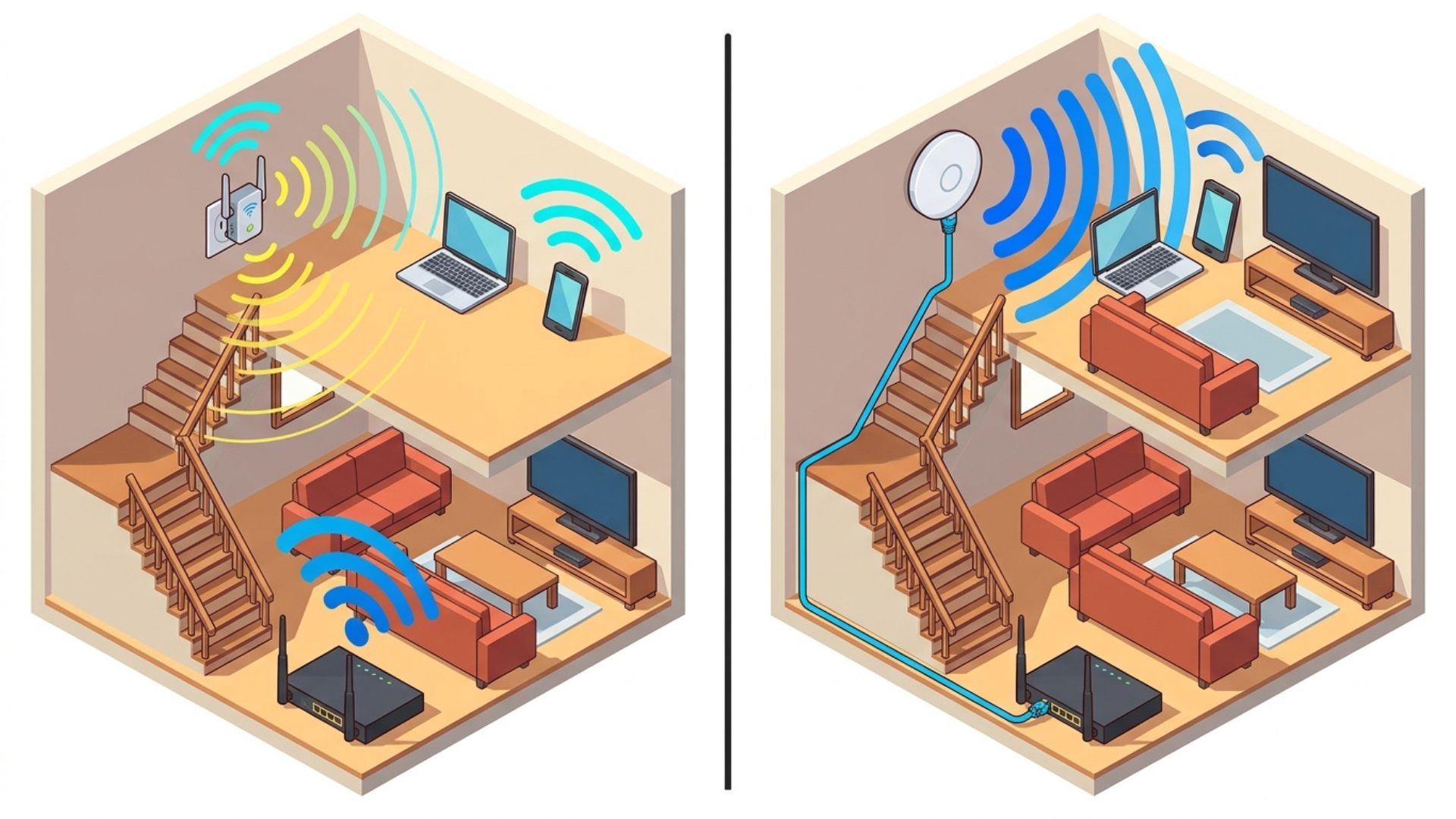
Having a large home or business premises often means that a single WiFi router cannot provide reliable coverage throughout the entire area. The signal may be strong near the router, but as you move farther away, the connection can become weaker. Some areas may even experience dead zones, where the WiFi signal is extremely weak or unavailable.
This is quite common in homes, villas, guest houses, offices, and businesses that rely on WiFi in Bali for their daily activities.
Two common options for expanding WiFi coverage are WiFi Extenders and Access Points (APs). Both can help extend your WiFi network, but they work differently and are suited to different situations. So, which one is right for you?
What Is a WiFi Extender?
A WiFi Extender, also known as a WiFi Repeater, works by receiving the WiFi signal from the main router and retransmitting it to areas farther away.
It is relatively easy to set up because it does not always require an Ethernet cable. You simply need to place it in an area that still receives a signal from the main router.
For example, if the router is in the living room and a bedroom at the back of the house has a weak signal, a WiFi Extender can be placed somewhere between the router and the bedroom to help extend the coverage.
However, there is one important thing to keep in mind: a WiFi Extender still depends on the quality of the signal from the main router.
If the extender is placed in an area where the original signal is already extremely weak, the extender will also struggle to provide a good connection.
What Is an Access Point?
An Access Point is a device that provides WiFi access using a network connection from the router or another main networking device.
Unlike an extender, which typically receives the signal wirelessly, an Access Point generally uses an Ethernet cable as its connection to the main network.
For example, a villa may have its main router in an office area while the guest rooms are located some distance away. An Ethernet cable can be connected from the router or network switch to an Access Point installed near the guest rooms.
With this setup, the Access Point can provide a more stable WiFi connection in that area.
Because it uses a wired connection as its backhaul, an Access Point is generally a better choice for areas that require a stable connection and need to support many devices.
When Should You Use a WiFi Extender?
A WiFi Extender can be a practical choice when your needs are relatively simple.
For example:
- Your home is not very large.
- Only one or two rooms have weak WiFi signals.
- Running an Ethernet cable is not practical.
- There are not too many users.
- You want a solution that is easy to install yourself.
For example, if your router is on the first floor and there is one room upstairs with a weak signal, a WiFi Extender can help improve coverage as long as it is placed where it can still receive a sufficiently strong signal from the router.
However, avoid placing the extender in an area where the signal has already disappeared. Ideally, it should be positioned where the connection to the main router is still reasonably strong.
When Is an Access Point Recommended?
An Access Point is more suitable when the network is used for more demanding needs.
For example:
- A home has multiple floors.
- A villa has multiple guest rooms.
- A guest house needs WiFi coverage across several areas.
- An office has many users.
- A stable connection is needed for online meetings.
- Many devices use the internet at the same time.
- You want to build a more structured WiFi network.
For properties such as villas and guest houses, Access Points also provide greater flexibility. Multiple APs can be installed in different areas and connected to the main network using Ethernet cables.
This allows larger properties to have better WiFi coverage without relying solely on the capabilities of a single router.
Does an Access Point Make the Internet Faster?
This is one of the most common misconceptions.
An Access Point does not automatically increase the speed of your internet plan. If your internet package provides 100 Mbps, installing an Access Point will not turn it into 200 Mbps.
The main purpose of an Access Point is to provide WiFi access in a specific area with a better connection to the main network.
That said, users may experience faster internet because their devices receive a stronger signal and maintain a more stable connection.
On the other hand, if the actual problem comes from your internet plan's capacity, too many users, ISP issues, or faulty networking equipment, simply replacing an extender with an Access Point may not solve the problem.
Which Is Better for Homes, Villas, and Offices?
For a small home, a WiFi Extender can be a practical solution if only a few areas have weak signals.
For multi-story homes or larger buildings, an Access Point or WiFi Mesh system often makes more sense, especially if Ethernet cabling can be installed.
For villas and guest houses, Access Points are generally recommended because the network needs to serve multiple rooms and users simultaneously. AP placement can also be planned based on guest rooms, pool areas, common spaces, or outdoor areas.
For offices, Access Points with a wired network are usually more suitable because the number of devices and connectivity requirements tend to be higher.
So, WiFi Extender or Access Point?
If you need a practical, affordable, and easy-to-install solution, a WiFi Extender can be a good choice.
However, if your priorities are stability, wider coverage, and the ability to support many users, an Access Point is generally the better option.
The most important thing is not simply choosing a device with high specifications. Your network design should also take into account the size of the building, number of users, router location, wall materials, bandwidth requirements, and the activities being performed online.
For internet in Bali, especially for homes, villas, offices, and businesses that require a stable connection, proper network planning can deliver much better results than simply adding more WiFi devices.
Gecko Internet can be one option for internet connectivity and network solutions in Bali. By assessing the location and requirements first, equipment such as routers, Access Points, or other WiFi systems can be selected based on actual day-to-day needs.
Ultimately, the goal of expanding WiFi coverage is not simply to make the signal bars appear full. It is to ensure that devices in every area receive a stable, responsive connection that meets the needs of the users.